If you ever experienced data deletion on your iPhone, you must have done all you can to recover the lost data. iPhone has become one of the most sophisticated devices ever. Its advanced technology does not allow room for any data loss, regardless of the version you use. And if such a situation, you will try every possible way to recover data from iPhone.
Especially when the data is business specific, accidental deletion is a cause of worry. Although Apple offers many ways to recover data from iPhone, yet none of these manual procedures helps when data is deleted permanently from the device. This is why it is necessary to take a backup of your files at regular intervals, as well as set up iTunes backup and iClouds backup to safeguard your data.
Therefore, knowing more about the common reasons for data loss can help recover data from your iPhone more effectively and efficiently.
Identify Reason behind iPhone Data Loss
- Accidental Deletion of iPhone Data
User error is among the most common reasons that cause data loss particularly, the image files. Accidental deletion and device format are the causes that lead to multimedia loss, and this makes it necessary to recover data along with other media files from iPhone - iOS Jailbreak Failure
Failure of Jailbreaking process leads to huge data loss and voids the warranty of the device. The operation is often stuck in the DFU mode and voids the warranty due to which you are not able to access the device.
What is Jailbreaking?
Jailbreaking is the process to remove restrictions on the software being imposed by Apple Inc. Operating System on all the devices including iPhone, iPad, iPod, or other gadgets. After bypassing DRM restrictions, users can run unauthorized applications and can make changes to the Operating System.
- iOS Upgrade
iPhone data loss can also occur in the case of an iOS version upgrade. Sometimes, users are not familiar with the overall upgrade process and accidentally format the memory, therefore, resulting in data deletion. To curb such a situation, it is essential to take a backup of your device. - Physical Damage
Although, when it comes to over-heating of the device, iPhones are considerably immune to it. However, there are other situations that affect iOS devices, such as water spill or sudden fall or slipping of the device, etc. This can lead to severe data loss. - Restore iPhone to Factory Settings
This is a common cause most iOS users often experience. By restoring your iPhone to factory settings, all the data existing on your iPhone will be automatically removed. It will also remove all the personal details of the user, though it will retain a few application - Virus or Malware
Like other devices, iPhones are prone to virus attacks. Malicious or malware intrusion can occur due to various reasons such as connecting your iPhone to an already affected system. In such a case, only a professional tool can help iPhone data recovery. - Forgotten Password or Passcode
Sometimes, you remove personal accounts such as email accounts, bank accounts, or other personalized accounts mistakenly; adding it once again is quite a task, especially if you no longer remember the login credentials. This makes you lose access to your important accounts.
Also, if you have forgotten your device's passcode, it restricts you from accessing your device, which is quite a handicap, considering your dependency towards your iPhone.
How to Recover your iPhone data?
If you are among the smart users who prefer backing up their data regularly, this is a good step to protect your iPhone data. If you have iTunes backup or iCloud backup files, all you need to do is restore data from the backup. And, you are done.
However, in case, you do not have a backup, then the only way to restore data is to employ a proficient third-party tool and then connect your device to the computer to recover data. Stellar Data Recovery for iPhone is well equipped to recover data from your iPhone device in the event of loss or accidental deletion.
One thing that makes the tool more scalable is that it works on both Windows and Mac machines. Don't forget to connect the iOS device to the system before initiating the iPhone data recovery procedure.
How it Works:
Let's understand the complete process to recover data from iPhone in detail.
- Step 1: Download and install Stellar Data Recovery for iPhone
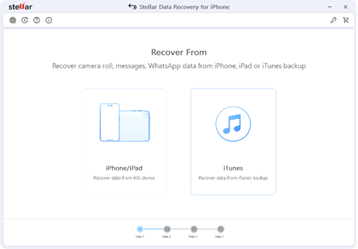
- Step 2: Recover From screen appears, displaying two options: Recover data from iOS device and Recover data from iTunes backup. Choose Recover data from iOS device option.
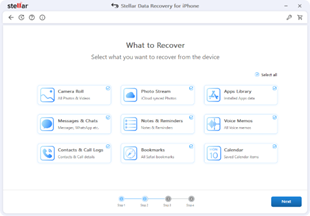
- Step 3: What to Recover screen appears, as shown below:
- Step 4: Select the type of data such as Camera Roll, Photos Stream, Apps Library, Messages & Chats, Notes & Reminders, Voice Memos, Contacts & Call Logs, Bookmarks, Calendar, that you want to recover and click Next.
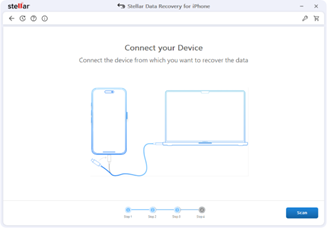
- Step 5: Connect your Device screen appears, as shown below
- Step 6: If your iPhone is encrypted, a dialog box will open prompting you to enter the password. Enter the password and click OK.
- Step 7: Plug your iOS device into your computer and select that device to proceed further.
- Step 8: After successful analyzing and scanning, you can now preview and save data. Following file types are supported: Camera Roll, Photo Stream, Apps Library, Contacts, Messages, Message Attachments, Call history, Calendar, Notes, Notes Attachments, Voice Memo, Reminder, Safari Bookmarks, WhatsApp, WhatsApp Attachments, Viber, Tango, WeChat, Line, Kik and Apps Library. From the left-hand side tree view, click the supported file type under the listed iOS device and all items under the selected supporting type head are listed.
- Step 9:You can either select all or a few items (by selecting the checkboxes in front of them).
- Step 10:From Save Files dialog box, click Browse and select a destination for saving the recovered files and click OK.
- Step 11:Click the Save button.
After the analysis, the software lists all the connected device.
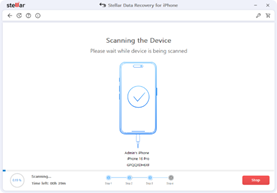
Note: In case you have connected multiple devices, the application lists all connected devices. Select the desired device.
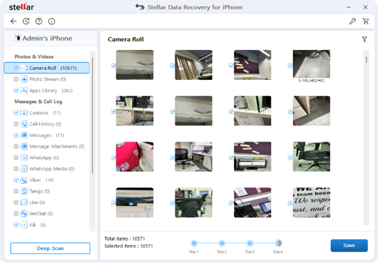
Note: All deleted items are listed in red whereas all others are black
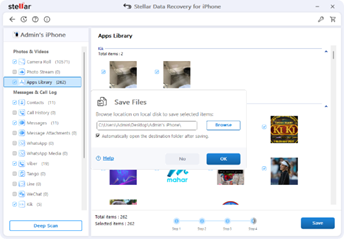
The scanning procedure may take considerable time as several calculations are involved. Memory and storage capacity of the iPhone also matter to the great extent. However, the integrity and original structure of the image files remain intact and unchanged.
The Way Forward
Thus, if you ever face a data loss on your iPhone which impacts your multimedia files, there's no need to despair, as you can now easily recover images, video clips, and audio with just a few clicks. However, to minimise the instance of data loss due to any failure and corruption, it is recommended to back up your iPhone regularly.